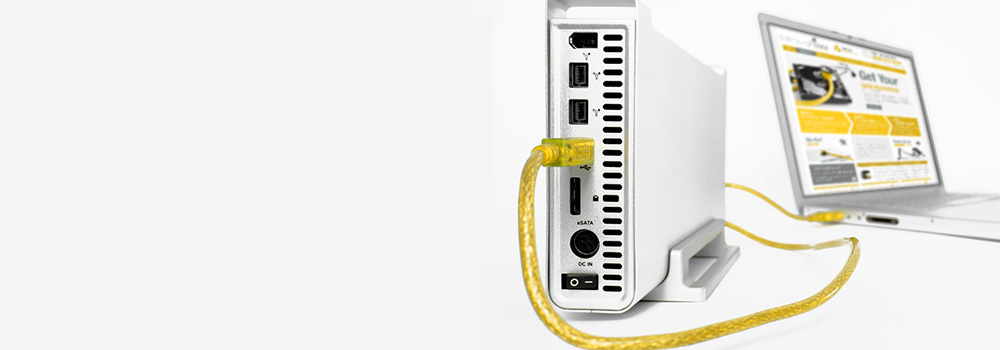








Iomega Recovery

Iomega Recovery

No Fix - No Fee!

Our experts have extensive experience recovering data from external hard drives. With 15 years experience in the data recovery industry, we can help you securely recover your data.
Iomega Recovery

No Fix? No Fee!

There's nothing to pay if we can't recover your data.

Laptop data recovery

No Job Too Large or Small

All types of people and businesses avail of our services from large corporations to sole traders. We're here to help anyone with a data loss problem.

Laptop on charge

Super Quick Recovery Times

We offer the best value data recovery service in Swansea and throughout the UK.

Laptop in use

Contact Us

Tell us about your issue and we'll get back to you.

An Explanation As To Why Iomega External Hard Drives Suddenly Fail:

Iomega External Hard drives are very complex pieces of hardware in their own right and along with your motherboard and memory and CPU go to make up the fundamental components of what makes your computer tick. There are times when an external hard drive will fail and this can be for any number of reasons. Chiefly among them is the fact that a piece of the hardware within the hard drive has ceased to function such as a head, a platter or a spindle. Something as simple sounding as a Ribbon Cable may also see its way clear to causing you problems reading or writing to your external hard drive so it is important – where possible – to diagnose and repaid the problem if able. If not we can certainly help you to recover your lost or inaccessible data.

Physical Failure To Your Iomega Hard Drive Caused By Internal Malfunction:

We at www.swanseadatarecovery.co.uk have dedicated our time and expertise to helping people just like you when a physical hard drive problem arises. When it comes to physical problems with hard drives these are many in number but commonly take the form of problems with actuators spinning off their axis, heads and platters becoming dislodged or even jumper connections becoming damaged due to access reconnecting and disconnecting if the drive has been removed and replaced a lot. Contact us to find out more about why your drive might physically fail and what we can do to help

Your Data And How It Can Be Lost or Formatted Incorrectly Using an Iomega Hard Drive:

When data is lost or inaccessible it can be for a variety of reasons. We have already looked at how hardware failings can cause your data to seem to be irretrievable but there are other reasons. Chief amongst the most common reasons for data to become lost or inaccessible is human error and while we would all like to think we are incapable of causing the loss of our own data, sadly it happens more often than we would like. In addition to human error there are also errors caused by bad sectors on a disk, which, if not dealt with upon first appearance, can expand into not just thousands of bad sectors but millions. Imagine allowing mold to form on a windowsill without removing it and you get some idea as to how bad sectors can spread across an external hard drive

Iomega External Hard Drives And Their Power Supplies:

An external hard drive is more prone to problems with power surges and power outages than an internal hard drive might be: this is because for the most part an external hard drive works on its own power supply fed by an individual cable. Sometimes a power cable connected to an external hard drive may become damaged and either accepts too much or not enough power. Likewise a serious power surge may send too many volts through the device causing circuitry to burn or a loss of data because of a surge power to the spinning hardware inside. With 15 years experience in this field we will be able to help you recover your data if not repair the drive even if you can’t get it to do anything after a surge or outage.

Firmware Faults That Can Render Your Iomega Hard Drive Inoperable:

As with many other devices within your computer an external hard drive works in conjunction with the firmware that has been factory loaded. The firmware is the small but important program that tells an external hard drive how to behave in relation to any device it may be connected to such as a USB port or hub a PC or Mac itself. With faulty firmware you may find that your drive will not allow the reading or writing of data and may even fail to recognise the existence of data you have already saved. We at www.swanseadatarecovery.co.uk are able to deal with problems caused by the corruption or loss of firmware.

Suddenly System Crashes And Their Effects On Your Iomega Hard Drive:

With a decade and a half’s worth of experience when it comes to computer and hard drive breakdowns we like to think we have seen most – or at least the majority – of problems that can arise because of problems with external and internal hard drives. One major problem caused by a discrepancy in the behaviour of an external hard drive is the sudden rebooting or shutdown of a computer without warning. This can be particularly frustrating if you are working on an important project in the workplace. Not only does the sudden shutdown of a computer lead to problems with the hardware but it can also lead to the loss or corruption of data stored on its internal and external hard drive. So if your computer shuts down without warning and will not reboot correctly; leave it switched off and contact us here at www.swanseadatarecovery.co.uk

Featured Article

Case Study: Recovery from an Iomega Ultramax Plus 4 Following a PCB Power Circuit Failure

Client Profile: User of an Iomega Ultramax Plus 4 external 4TB hard drive.
Presenting Issue: Complete power loss with no signs of life (no LED, no sounds). The client’s attempt to use a new PSU resulted in a “crash,” suggesting a potential electrical fault. Data is inaccessible.

The Fault Analysis

The client’s experience is a classic example of a printed circuit board (PCB) level failure. The initial lack of power pointed to an issue within the drive’s internal power circuitry, not necessarily the external power supply. The subsequent “crash” with a new PSU is highly indicative of a catastrophic component failure on the PCB, such as a shorted TVS Diode (Transient Voltage Suppression), a failed 5V/12V Regulator IC, or a blown Fuse.

When a faulty PCB experiences a power surge (even from a new, correct PSU), these protective components can fail short-circuit to protect the more sensitive preamplifier and drive mechanics. This creates a dead short, causing the PSU to shut down or, in worst-case scenarios, sending uncontrolled voltage to the drive’s core components, potentially damaging the preamplifier on the Head Stack Assembly (HSA).

The Professional Data Recovery Laboratory Process

Recovery from this scenario requires a component-level PCB repair or replacement, followed by a stability assessment of the drive mechanics.

Phase 1: PCB-Level Forensic Diagnosis and Repair

  1. Visual and Multimeter Inspection: The drive is disassembled in our ESD-safe lab. The PCB is removed and subjected to a microscopic visual inspection for burnt components, cracked solder joints, or popped capacitors. We then use a multimeter to test for continuity across the fuses and for short circuits across the TVS diodes (typically labeled D1/D2 for 5V/12V lines) and the motor driver IC.

  2. Component-Level Surgery:

    • TVS Diode Removal: If a TVS diode is found to be shorted (a common failure), it is carefully desoldered from the board. These are sacrificial components, and their removal often restores electrical continuity. We do not typically replace them for recovery purposes, as their primary function is to protect the drive from future surges.

    • Fuse Replacement: If a fuse is blown, it is replaced with an identical-rated component to restore power.

    • Firmware Transfer (Donor PCB Matching): If the PCB damage is irreparable (e.g., a fried motor controller), a donor PCB from an identical model drive must be sourced. However, modern drives store unique, drive-specific adaptive data in a serial flash memory chip (e.g., an 8-pin 25-series chip) on the PCB. This data is essential for the drive to calibrate itself. We use a programmer to read this firmware from the patient’s original PCB and write it to the donor PCB, effectively transferring the drive’s “personality.”

Phase 2: Stabilised Power-Up and Firmware Interrogation

With a functionally repaired PCB, the drive is connected to our PC-3000 system with its lab-grade, current-limited power supply.

  • Safe Power Application: The current-limited power supply prevents catastrophic damage if an undiagnosed short remains. We monitor the power rail draw for anomalies.

  • Terminal-Level Communication: The PC-3000 system attempts to establish a terminal-level connection with the drive’s firmware. We check for readiness and any error codes reported by the drive’s internal processor.

  • System Area (SA) Accessibility Check: We attempt to read critical firmware modules from the System Area on the platters, such as the P-List (Permanent Defect List) and Translator Module. Successful reading indicates the preamplifier and heads are functional.

Phase 3: Physical Assessment and Forensic Imaging

  1. Mechanical Function Test: We listen for the characteristic spin-up of the drive and the successful load/unload of the read/write heads. Any irregular sounds (clicking, scraping) would indicate a need for a clean room head stack assembly (HSA) replacement.

  2. Sector-Level Imaging: Assuming stable mechanics, we initiate a sector-by-sector clone using the DeepSpar Disk Imager. This hardware is configured with adaptive read retry algorithms to gently handle any marginally readable sectors resulting from the power event. A bad sector map is generated to log any unrecoverable areas.

Phase 4: Data Extraction and Integrity Verification

The completed disk image is mounted as a virtual drive in our secure software suite.

  • Partition Table and File System Analysis: We parse the GUID Partition Table (GPT)—standard for a 4TB drive—and the file system (likely NTFS or HFS+) to rebuild the directory structure.

  • Data Integrity Checks: Checksums are verified on a sample of recovered files to ensure the data was not corrupted by the power failure event.

Conclusion

The client’s Iomega drive suffered a critical failure of the power regulation circuitry on its PCB, likely involving shorted TVS diodes or a blown fuse. The client’s new PSU simply completed the failure cycle. A professional lab succeeds by performing component-level electronic repair, including potential firmware transplantation, to restore stable communication with the drive. Only then can a forensic image be created, bypassing the original hardware fault to secure the data.

The recovery was successful after we identified and removed a shorted 5V TVS diode on the PCB. The drive powered up stably, and we achieved a 100% recovery of all client data.


Bracknell Data Recovery – 25 Years of Technical Excellence
When your external storage device suffers an electrical failure, trust the UK’s No.1 HDD and SSD recovery specialists. Our in-house PCB repair and firmware manipulation capabilities allow us to resolve power-related failures at the component level, recovering data where simple part swapping fails.

Client Testimonials

“ I had been using a Lacie hard drive for a number of years to backup all my work files, iTunes music collection and photographs of my children. One of my children accidently one day knocked over the hard drive while it was powered up. All I received was clicking noises. Swansea data recovery recovered all my data when PC World could not.   ”

Morris James Swansea

“ Apple Mac Air laptop would not boot up and I took it to Apple store in Grand Arcade, Cardiff. They said the SSD hard drive had stopped working and was beyond their expertise. The Apple store recommended Swansea data recovery so I sent them the SSD drive. The drive contained all my uni work so I was keen to get everything recovered. Swansea Data Recovery provided me a quick and professional service and I would have no hesitation in recommending them to any of my uni mates. ”

Mark Cuthbert Cardiff

“ We have a Q-Nap server which was a 16 disk raid 5 system. Three disks failed on us one weekend due to a power outrage. We contacted our local it service provider and they could not help and recommended Swansea Data Recovery. We removed all disks from server and sent them to yourselves. Data was fully recovered and system is now back up and running. 124 staff used the server so was critical for our business. Highly recommended. ”

Gareth Davies Newport Wales

“ I am a photographer and shoot portraits for a living. My main computer which I complete all my editing on would not recognise the HDD one day. I called HP support but they could not help me and said the HDD was the issue. I contacted Swansea Data Recovery and from the first point of contact they put my mind at ease and said they could get back 100% of my data. Swansea Data Recovery have been true to their word and recovered all data for me within 24 hours. ”

Iva Evans Cardiff

“ Thanks guys for recovering my valuable data, 1st rate service. ”

Don Davies Wrexham

“ I received all my data back today and just wanted to send you an email saying how grateful we both are for recovering our data for our failed iMac.   ”

Nicola Ball Cardiff

“ Swansea Data Recovery are a life saver 10 years at work was at the risk of disappearing forever until yourselves recovered all my data, 5 star service!!!!!   ”

Manny Baker Port Talbot Wales